Free WordPress plugin · Built by Keshav Infotech
Free WooCommerce AI Chatbot & Store Assistant
Keshav Infotech AI Store Assistant for WooCommerce
A storefront assistant for WooCommerce shops. It answers product and store-policy questions, helps shoppers find products and collects enquiries with consent. Connect your own OpenAI key only if you want AI-written answers.
Free. Requires WooCommerce. No API key needed in Local Only mode.
- Price
- Free plugin
- Requires
- WooCommerce, active
- Default mode
- Local Only, no API key
- Optional AI
- Your own OpenAI key
What it helps you do
A storefront assistant for the questions shoppers actually ask.
Answer product questions
Shoppers ask about what you sell. Answers come from your WooCommerce catalogue.
Explain your store policies
Your FAQ, shipping, returns, payment and contact details, as you entered them.
Help people find products
Basic search inside the chat, with product cards and simple suggestions.
Collect enquiries with consent
A lead form with an explicit consent tick. Leads are stored on your own site.
See how it works
The real plugin, on the storefront and in your dashboard.
There is no hosted demo. These are screenshots of the published plugin.
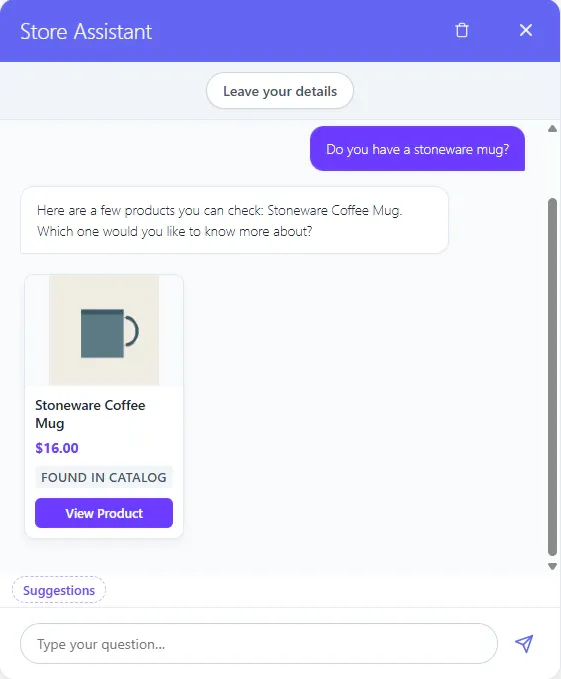
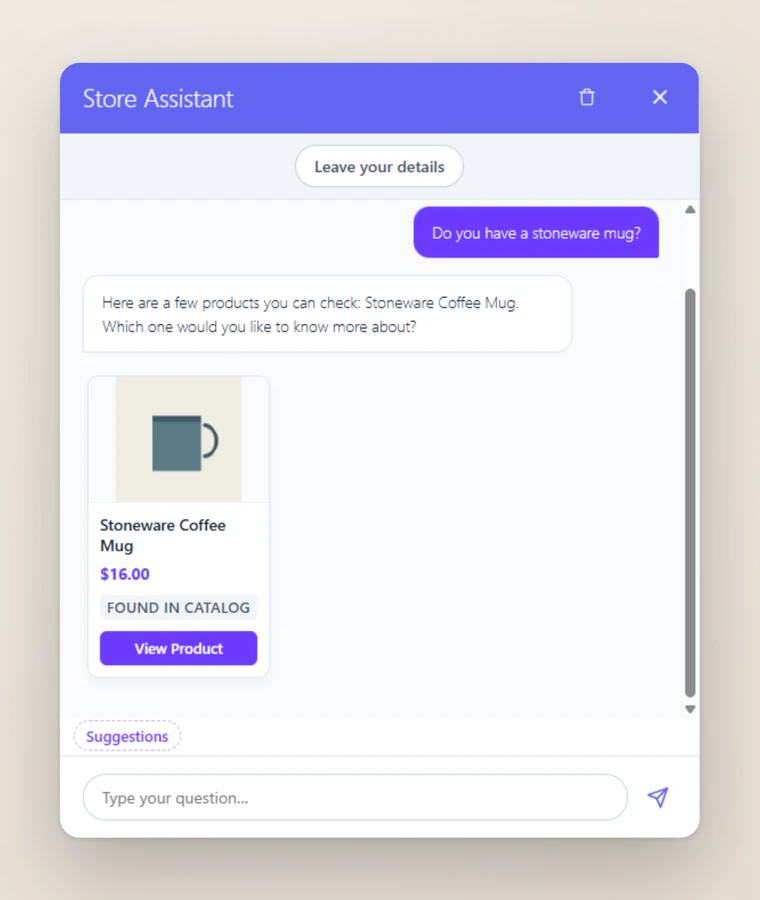
A product question, answered from the catalogue with a product card. Captured from version 1.0.0 in Local Only mode on a sample store. 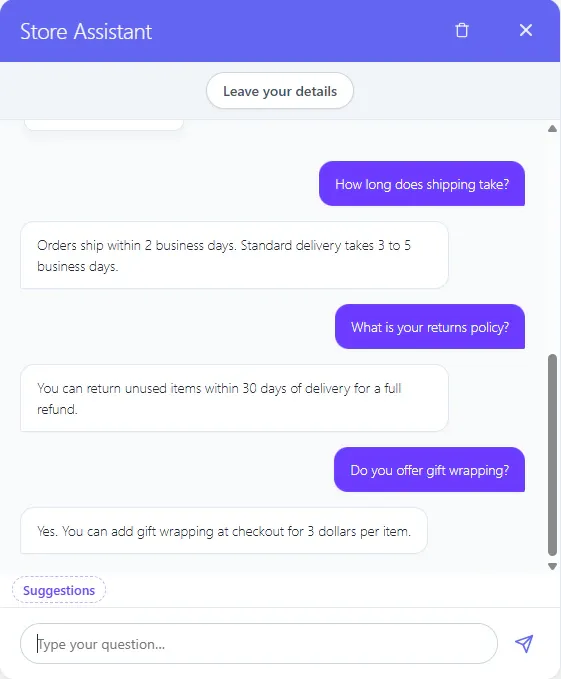
Store policy and FAQ questions, answered from what the merchant entered. Captured from version 1.0.0 in Local Only mode on a sample store. 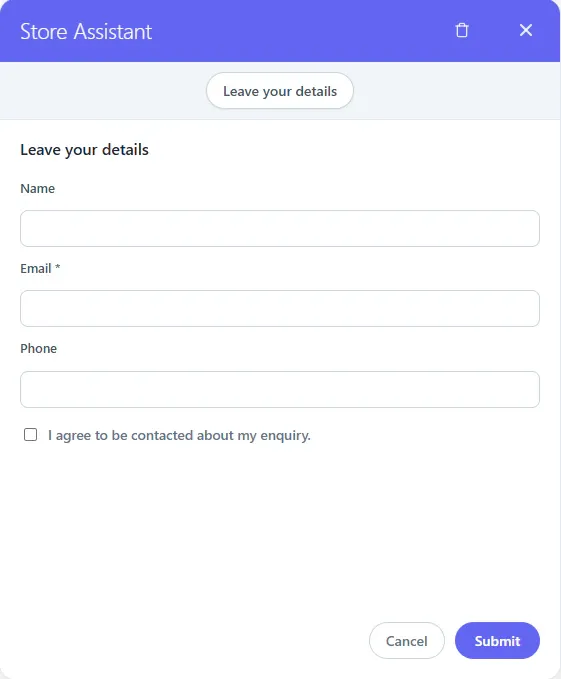
The lead form. Details are saved only after the visitor ticks the box and submits. Captured from version 1.0.0 in Local Only mode on a sample store. 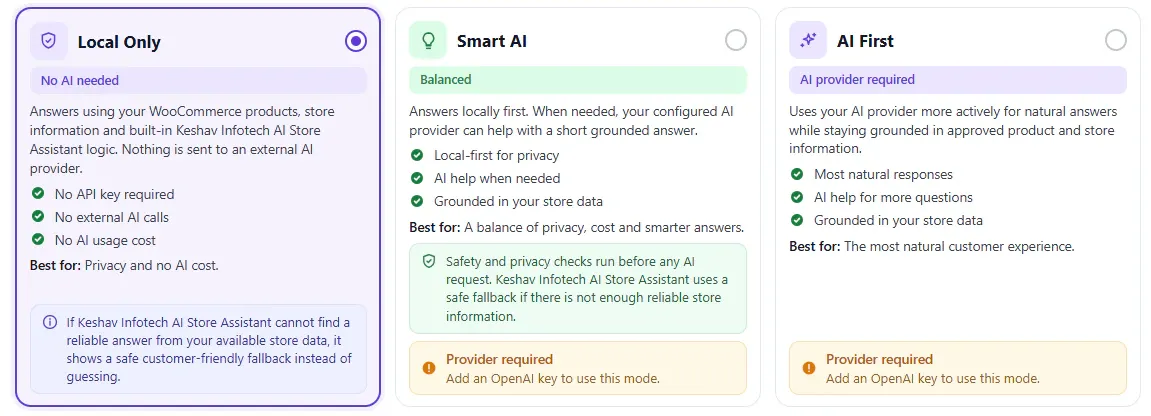
Choosing an answer mode during setup, with Local Only selected. Captured from version 1.0.0 in Local Only mode on a sample store. 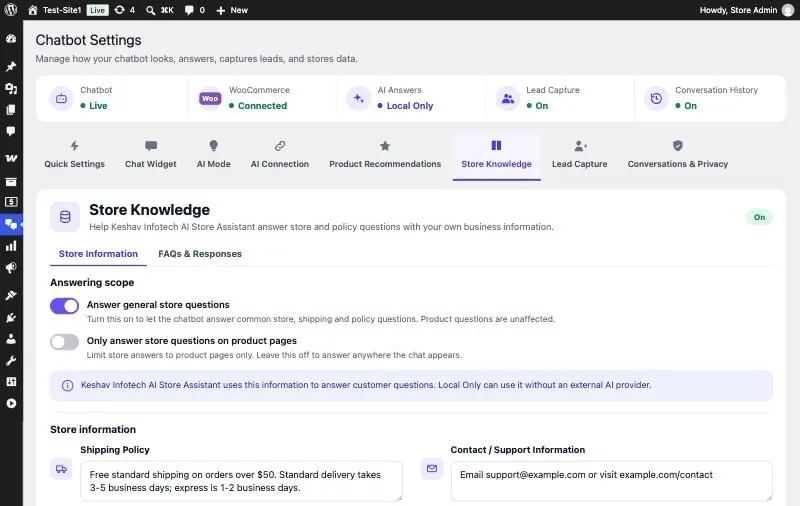
Store Knowledge: FAQs, shipping, returns, payment, contact details and store hours. Official WordPress.org screenshot, with example data. 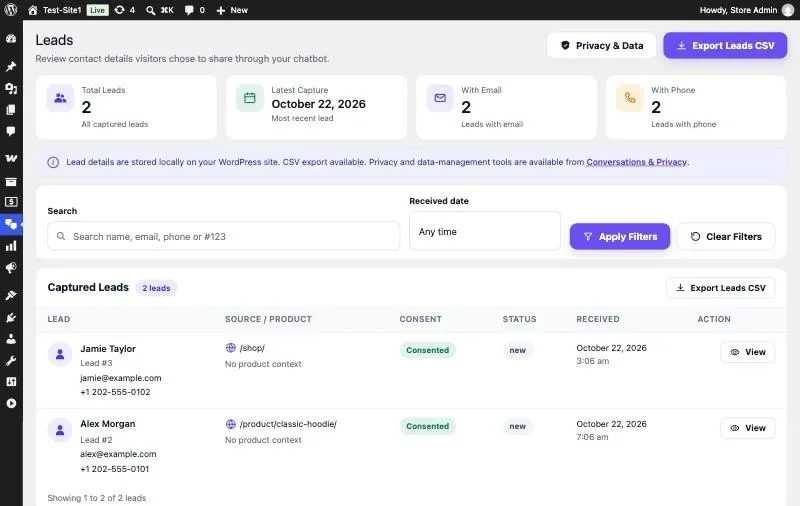
Leads, stored on your site, with CSV export. Official WordPress.org screenshot, with example data. 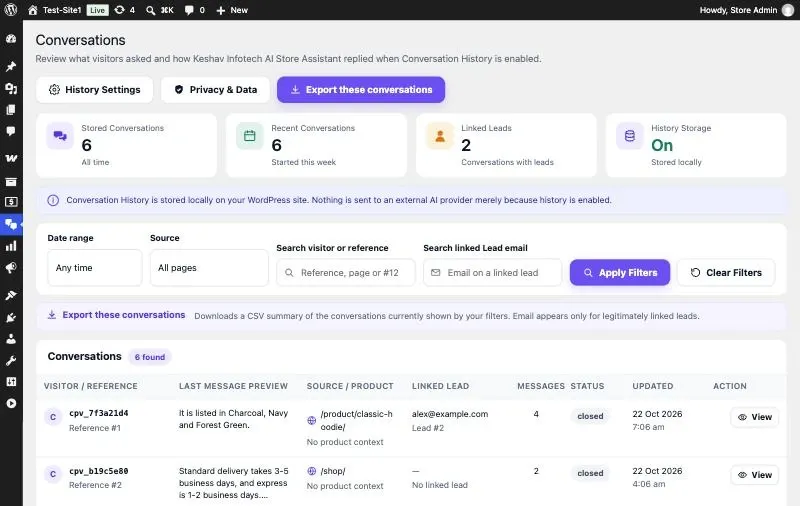
Conversations appear only if you switch history on. Official WordPress.org screenshot, with example data.
Three answer modes
You choose whether AI is involved at all.
Local Only is the default. Both AI modes need your own OpenAI API key, and work only after you select the mode and save the key.
Local Only Default
Answers come only from your products and the store information you enter.
- External AI
- No external AI service is contacted at all.
- Key
- No API key needed.
- Cost
- No AI provider, so no provider bill.
Smart AI
Local answers first. When the chatbot is unsure, it may use your OpenAI key to produce a short answer grounded in your store data.
- External AI
- May contact OpenAI when it is unsure.
- Key
- Your own OpenAI API key.
- Cost
- OpenAI bills you directly for its usage.
AI First
Natural answers composed with your OpenAI key, still grounded strictly in your store data.
- External AI
- Uses OpenAI to compose answers, within the same data limits.
- Key
- Your own OpenAI API key.
- Cost
- OpenAI bills you directly for its usage.
What works without a key
Product answers, store FAQ and policy answers, basic product search and suggestions, and lead capture all work in Local Only. It uses set wording around the information in your store, and when it finds no match it says it does not have that information.
Why you might add OpenAI
For more natural wording, or a short answer when the local match is unsure. In an AI mode, visitor questions may be sent to OpenAI, and that can include a name or address a visitor types. OpenAI bills you directly: the plugin provides no AI credits, so that cost is yours and depends on your use.
Features
What is in the plugin.
- Answers about products from your WooCommerce catalogue
- FAQs and store policies you configure
- Basic in-chat product search and simple suggestions
- Lead form with an explicit consent tick
- Lead list, detail view and CSV export in your dashboard
- Optional conversation history, off by default
- Export, erase and retention tools for the data actually stored
Privacy and data
What happens to data, in plain words.
Local Only
No external service is contacted at any time.
AI modes
OpenAI is contacted only if you selected an AI mode and OpenAI as provider, and saved your own key.
What may be sent
In Smart AI and AI First, the visitor’s question may be sent to OpenAI with a minimal amount of product or store information. That can include a name or postal address the visitor types. Emails, phone numbers and card-like numbers are removed from the question first, but removal is not guaranteed to catch all personal information.
What is never sent
Your store’s customer records, cart or order contents, account and payment details, API keys and admin notes. Questions about orders, accounts, cards or passwords are refused locally.
Leads
Stored on your own site, after the visitor ticks the consent box. Nothing goes to Keshav Infotech.
Conversation history
Off by default. If you switch it on, exchanges are stored on your own site, where you can export, erase and set a retention period.
In the visitor’s browser
The visible chat is kept in browser storage. It expires after 30 minutes of inactivity and is capped at 30 messages.
Clear chat
Removes the browser copy only. Records saved on your server stay until you erase them or retention removes them.
Telemetry
The plugin sends no analytics, telemetry or usage statistics anywhere.
These tools help you handle data requests, but they do not make a store legally compliant by themselves. That stays with you. This page describes how version 1.0.0 behaves when tested. The WordPress.org listing also explains how your API key is stored. The listing’s wording about names is being updated, and the plugin’s AI Connection screen still says names are not sent; where they differ, this page reflects the tested behaviour.
Install and set up
From WordPress.org to your storefront.
Needs WordPress 6.0 or later, PHP 7.4 or later, and WooCommerce. Tested up to WordPress 7.1.
Install WooCommerce
Install and activate WooCommerce. The plugin depends on it.
Install the plugin
Install and activate Keshav Infotech AI Store Assistant for WooCommerce from WordPress.org.
Complete the six short setup steps
Open Keshav Infotech AI Store Assistant, then Setup. The steps check WooCommerce, let you choose how the chatbot answers, add your store information and decide about lead capture.
Review your store information
Check your FAQs and policies, and stay on Local Only or choose an AI mode. Local Only needs no key.
Try it on your storefront
Ask the questions your shoppers ask, then adjust what you entered.
Is it right for you?
A clear fit, and clear limits.
A good fit for
- Small WooCommerce stores that get the same product questions again and again
- Stores that want policy answers available in the shop itself
- Merchants who want to start without an AI provider, and decide about one later
- Merchants who want optional OpenAI answers without buying AI credits from a plugin publisher
What it is not
- A live-chat helpdesk. No human agents or support tickets.
- A cart-recovery tool. No cart tracking, recovery emails or discounts.
- A private order assistant. It does not look up orders or customer accounts.
- A marketing automation system. No WhatsApp, SMS or CRM connections.
- An advanced search engine. Product search here is basic and happens inside the chat.
- A chatbot for any website. It needs WooCommerce and does not run without it.
Who built it
Published by a software company, on its own WordPress.org account.
Keshav Infotech is a software development company in Rajkot, Gujarat, India, established in 2008, with a 70+ in-house team. We build mobile apps, web products, connected-device apps and games for clients. This plugin is our own product, published on WordPress.org as keshavinfotechwp.
The plugin itself is new: version 1.0.0 was released on 2 November 2026. The company’s history and client reviews are about our client work, not this plugin, so check the listing for its own reviews and active installs.
Help comes through the plugin’s support forum on WordPress.org.
Questions
Before you install
Is the plugin free?
Yes. The plugin is free on WordPress.org. If you switch on Smart AI or AI First, OpenAI bills you directly for its API usage. The plugin includes no AI credits and does not resell AI usage.
Is WooCommerce required?
Yes. WooCommerce must be installed and active. This is a plugin for WooCommerce stores, not for other kinds of website.
Do I need an OpenAI API key?
Only for Smart AI or AI First. Local Only is the default and works without any key or OpenAI account.
What is Local Only mode?
Answers come only from your products and the store information you enter, and no external AI service is contacted. Because no AI writes the answers, they will not read like AI First answers.
How do Smart AI and AI First differ?
Smart AI answers locally first and may use your OpenAI key when it is unsure. AI First composes natural answers with your key, still grounded strictly in your store data.
Who pays for OpenAI usage?
You do, on your own OpenAI account. Keshav Infotech does not sell or include AI credits. Local Only avoids those charges because it makes no provider calls.
Can it answer questions about shipping and returns?
Yes, from the shipping, returns, payment, contact and FAQ information you enter in Store Knowledge.
Does it collect customer details?
With lead capture, when a visitor submits the form and ticks the consent box, their name, email, phone if provided, page and time are stored on your own site. Nothing is sent to Keshav Infotech.
Are chats saved, and does Clear chat delete them?
The visible chat stays in the visitor’s own browser, expiring after 30 minutes of inactivity. Saving conversations on your server is optional and off by default. Clear chat removes only the browser copy; anything saved on your site stays until you erase it or your retention period removes it.
Will private customer details go to OpenAI?
In Smart AI and AI First, the visitor’s question may be sent to OpenAI with a minimal amount of product or store information. That can include a name or postal address the visitor types. Emails, phone numbers and card-like numbers are removed first, but removal is not guaranteed to catch all personal information. Your store’s customer records, cart or order contents, account and payment details are never sent. In Local Only, nothing goes to any AI service.
What happens if WooCommerce is deactivated?
The chatbot pauses. Your settings and captured leads are left as they are.
Where do I get help?
Through the plugin’s support forum on WordPress.org, plus the help text built into each screen.
Add a free AI Store Assistant to your WooCommerce store
Free on WordPress.org. Starts in Local Only mode, with no API key.